Image Comparison
Karate does visual regression testing through the karate-image extension: compare screenshots against baseline images with configurable tolerance, two comparison engines, and an interactive diff viewer in the HTML report.
In Karate v2 image comparison is a separately-published extension (karate-image), not a built-in keyword. The v1 compareImage keyword and karate.compareImage(...) method are gone; the surface is now an image object you activate from karate-boot.js. It exposes small primitives (image.diff / image.resolve / image.write), and the establish → compare → report → fail loop is a short, overridable JS recipe you keep in your project (shown below) rather than a baked-in keyword. See the Migration Guide if you are coming from v1.
Overview
Image comparison is useful for:
- Visual regression testing — detect unintended UI changes
- Screenshot validation — verify rendered output matches expectations
- Cross-browser testing — compare rendering across browsers
- Document validation — verify generated images / rendered documents
What the extension gives you:
- Two comparison engines — Resemble (pixel-based) and SSIM (structural), usable together
- Baseline by name —
image.diff('home', shot)resolves the baseline + per-image options; a short recipe adds auto-establish + reporting - Configurable tolerance — a percentage mismatch threshold, suite-wide or per image
- Ignored regions — exclude dynamic content (timestamps, ads, carousels) — set in a file or drawn in the report
- Interactive report — a diff lightbox with side-by-side / slider / blink / onion views, plus live re-diff and visual ignore-box authoring
Setup
The extension is a separate artifact. Add it as a Maven/Gradle dependency for JVM runs, or drop the fat JAR into ~/.karate/ext/ for the standalone CLI.
- Maven
- Gradle
- Standalone CLI
<dependency>
    <groupId>io.karatelabs</groupId>
    <artifactId>karate-image</artifactId>
    <version>{'{karate.version}'}</version>
    <scope>test</scope>
</dependency>
testImplementation "io.karatelabs:karate-image:{karate.version}"
Download the karate-image JAR and drop it into your extension directory — no build tool needed:
~/.karate/ext/karate-image.jar     # global, all projects
.karate/ext/karate-image.jar       # per-project
The launcher picks up any JAR in those directories automatically.
Activate it in karate-boot.js
Extensions are turned on from a karate-boot.js file at your working-directory root — it runs once per suite, before any test. Calling boot.ext('image') activates the extension and puts the image object into every scenario's scope. This is also where you set suite-wide defaults:
// karate-boot.js
const image = boot.ext('image');
image.baselineDir = 'baselines';     // where baseline images live
image.optionsDir = 'baselines';      // where <name>.json tuning files live (defaults to baselineDir)
image.threshold = 0.5;               // max % mismatch tolerated (suite default)
image.engine = 'resemble';           // 'resemble' | 'ssim' | 'resemble,ssim' | 'resemble|ssim'
image.report = 'mismatched';         // attach diff images: 'all' | 'mismatched' | null
Without a karate-boot.js that calls boot.ext('image'), the image object is not in scope. See Extensions and karate-boot.js for the activation model.
The image API
The image object is both the config holder and a small set of primitives. Each scenario gets its own instance (so per-scenario config is parallel-safe), seeded with the boot-time defaults above.
In v2 the orchestration — capture, establish a missing baseline, compare, attach the diff, fail on a regression — is a short JS recipe you keep in your project, not a baked-in keyword. Drop this screenGrab helper into a JS file loaded from karate-config.js (so it runs in scenario scope, where screenshot() / karate resolve correctly) and call it from your features:
// common.js — copy and tweak for your workflow
function screenGrab(name) {
  const latest = screenshot();                  // Uint8Array, byte[], or a path string
  const p = image.resolve(name);                // { baselinePath, optionsPath, baselineExists }
  const established = !p.baselineExists;
  if (established) image.write(name, latest);    // first run: adopt latest as the baseline
  const r = image.diff(name, latest);            // compare + build the report embed
  r.baselineEstablished = established;
  if (r.embed) {
    r.embed.meta.baselineEstablished = established;
    karate.embed(r.embed);                        // attach baseline / latest / diff to the report
  }
  if (!r.pass && image.failOnMismatch !== false) karate.fail(r.error.message);
  return r;
}
* def r = screenGrab('home')
* match r.pass == true
Keeping the loop as a recipe (rather than a keyword) leaves policy — what to establish, when to fail, how to report, where baselines live — fully in your hands and visible. It builds on three primitives:
image.diff
image.diff(name, latest, options?) is the comparison itself. Given a name it resolves the baseline at <baselineDir>/<name>.<ext>, auto-loads per-image options from <optionsDir>/<name>.json if present (see Per-image options), runs the engine(s), and returns a result object carrying a ready-to-attach embed payload. It is pure: it never throws, never writes files, never auto-establishes, and attaches nothing itself — the recipe decides all of that.
The latest argument accepts any of:
- A screenshot
- A file path
- Raw bytes
# driver screenshot() returns a Uint8Array — pass it straight through
* driver 'https://example.com'
* def shot = screenshot()
* image.diff('homepage', shot)
# a path string, resolved via this: / classpath: / file: / relative
* image.diff('homepage', 'classpath:screenshots/home.png')
# raw decoded bytes (byte[]) also work
* def bytes = karate.readAsBytes('screenshots/home.png')
* image.diff('homepage', bytes)
One-shot map form
For full control in a single call, pass a map — override the baseline location, or set per-call options that win over everything else:
* def r = image.diff(
  """
  {
    name: 'home',
    latest: #(shot),
    baseline: 'classpath:baselines/home.png',
    threshold: 1.5,
    engine: 'ssim'
  }
  """)
image.resolve
image.resolve(name) → { baselinePath, optionsPath, baselineExists } (absolute paths), honouring baselineDir / optionsDir and any <name>.<ext> image extension. The recipe uses it to decide whether to establish a baseline; power users use it to build their own flow or point a custom report at the files.
image.write
image.write(name, latest) (or an explicit path) writes the image bytes to the resolved baseline and returns the absolute path — the programmatic establish / rebase. (karate.write can't target a baseline outside the report output directory, so use this.) When a UI change is intentional, adopt it and commit the updated baseline:
* image.write('home', screenshot()) # overwrite baselines/home.<ext> with this image
The result object
diff(...) returns a map you can branch on — handy together with failOnMismatch = false:
* image.failOnMismatch = false
* def r = image.diff('home', shot)
* match r contains
  """
  {
    name: 'home',
    pass: '#boolean',
    mismatch: '#boolean',
    mismatchPercentage: '#number'
  }
  """
| Field | Meaning |
|---|---|
name | the image name you passed |
pass | true if within threshold |
mismatch | true when pixels differed beyond the threshold |
mismatchPercentage | how different latest is from baseline, as a percentage |
resembleMismatchPercentage / ssimMismatchPercentage | per-engine numbers, when that engine ran |
threshold / engine | the effective values used |
scaleMismatch | true when latest and baseline dimensions differ |
error | { message, type } when not passing — omitted on pass; type is one of mismatch / scaleMismatch / baselineMissing / ioError |
embed | the report payload — forward to karate.embed(r.embed); null when report says no diff is warranted |
baselineEstablished is set by the recipe (only it knows it just created the baseline), not by diff.
Configuration
Three interchangeable ways to set config, all writing the same map (each layer overlays — it does not replace):
# 1. suite defaults — karate-boot.js (shown above)
#    const image = boot.ext('image'); image.baselineDir = 'baselines'

# 2. per-scenario property setters
* image.threshold = 0.5
* image.engine = 'resemble,ssim'

# 3. bulk overlay (preserves earlier defaults)
* image.config = { engine: 'ssim', report: 'all' }
Precedence (low → high): suite/scenario config → <name>.json options file → per-call inline options.
| Key | Default | Description |
|---|---|---|
baselineDir | (none) | Directory holding baseline images |
optionsDir | (= baselineDir) | Directory holding per-image <name>.json option files — split it out to keep options local while baselines live in, say, S3 |
threshold | 0 | Max acceptable mismatch, as a percentage. 0 means pixel-exact |
engine | 'resemble' | 'resemble', 'ssim', or both — 'resemble,ssim' (run all, smallest diff wins) or 'resemble|ssim' (run in order, stop under threshold). See Combining engines |
failOnMismatch | true | When false, the recipe returns a result instead of failing the step |
report | 'mismatched' | When to attach diff images: 'all', 'mismatched', or null |
allowScaling | false | Rescale latest to baseline dimensions before comparing |
rebaseCommand | (none) | Override the shell command the report's Rebase button shows |
optionsCommand | (none) | Override the command the report's Show options button shows |
Both command templates accept the placeholders ${baselinePath}, ${latestPath}, ${optionsPath}, and ${json} (the generated options JSON, for optionsCommand) — handy when baselines live somewhere like S3 and you want the buttons to emit your own upload/copy command.
Engine-specific options (ignoredBoxes, ignoreColors, tolerances, errorColor, …) are covered below and are typically set per image.
Comparison engines
Resemble (pixel-based)
The default. Compares pixels using the Resemble algorithm.
* image.engine = 'resemble'
Best for: exact pixel matching, colour/styling differences, small UI changes. Fast and sensitive.
SSIM (structural)
Structural Similarity Index — closer to human perception, more tolerant of minor pixel noise.
* image.engine = 'ssim'
Best for: layout/structural changes, perceptual comparison, screenshots with slight rendering jitter.
Combining engines
You can run more than one engine and pick the verdict logic with the separator. In both modes the smallest mismatch across the engines that ran is the one that counts (so a comparison passes if any engine falls within threshold) — the difference is how many engines actually run:
- Comma (
resemble,ssim) — runs all engines every time and keeps the smallest diff. Most thorough, but does the most work. - Pipe (
resemble|ssim) — runs engines in order and stops as soon as one comes in under the threshold; later engines are only a fallback when the current diff is still too large. Often faster, while still using extra engines to absorb minor visual differences (fewer flaky failures).
* image.engine = 'resemble,ssim'   # always run both, take the smallest diff
* image.engine = 'resemble|ssim'   # try resemble first, fall back to ssim only if it exceeds threshold
Per-image options
Some screens need their own tuning — a higher tolerance, or ignored regions for dynamic content. Drop a JSON file named after the image in your optionsDir (which defaults to baselineDir): <optionsDir>/<name>.json. image.diff('<name>', …) auto-loads it; no code change at the call site.
// baselines/home.json
{
  "threshold": 2.0,
  "ignoredBoxes": [
    { "top": 0, "left": 0, "right": 320, "bottom": 60 }
  ]
}
# picks up baselines/home.json automatically
* screenGrab('home')
The report lightbox's Show options button (under Advanced) generates exactly this JSON from the options + ignore boxes you set interactively — copy it into the file.
This keeps each image's quirks alongside its baseline, version-controlled together, instead of scattered through your feature files.
Diff appearance options
Beyond tolerance and ignored regions, the Resemble engine takes a few options that shape the diff image. Set them in <name>.json or per call — and the report's Advanced panel opens on whatever you set here (e.g. an errorType of diffOnly opens there, not on the default):
| Key | Values | Effect |
|---|---|---|
errorType | movement (default) · flat · diffOnly · flatDifferenceIntensity · movementDifferenceIntensity | how changed pixels are highlighted in the diff |
errorColor | { red, green, blue } | the colour painted over changed pixels |
transparency | 0–1 | opacity of the unchanged image under the diff (lower = more transparent, so changes stand out) |
ignoreColors | true / false | compare luminance only (absorbs anti-aliasing / colour noise) |
The fastest way to find the right values is to tune them live in the report's Advanced panel and click Show options to emit the JSON.
Ignored regions
Exclude dynamic content (clocks, ads, randomised data) by listing rectangles to skip. Coordinates are top / left / right / bottom in pixels. The easiest way to author them is in the report: open a diff, toggle Advanced, and drag boxes on the image — the live diff updates as you go, and Show options emits the JSON to paste into the image's .json file. You can also set them per call:
* def r = image.diff(
  """
  {
    name: 'dashboard',
    latest: #(shot),
    ignoredBoxes: [
      { top: 0, left: 0, right: 100, bottom: 50 },
      { top: 300, left: 200, right: 400, bottom: 350 }
    ]
  }
  """)
To absorb anti-aliasing noise rather than mask a region, the Resemble engine can compare luminance only:
* def r = image.diff({ name: 'home', latest: '#(shot)', ignoreColors: true })
Report integration
When the recipe calls karate.embed(r.embed), it attaches the baseline, latest, and a precomputed diff to that step. The extension renders a compact thumbnail with a pass / fail / established badge and an Expand button; clicking the thumbnail or Expand opens a lightbox built around one image stage:
- View toggles (always available): Diff (default) · Slider (drag to wipe) · Blink · Onion (opacity). Side by side is a separate toggle that pins baseline + latest beside the stage; 100% toggles fit ↔ 1:1 zoom. The dialog itself is resizable — drag its corner and the fitted image (and the side-by-side panes) rescale live.
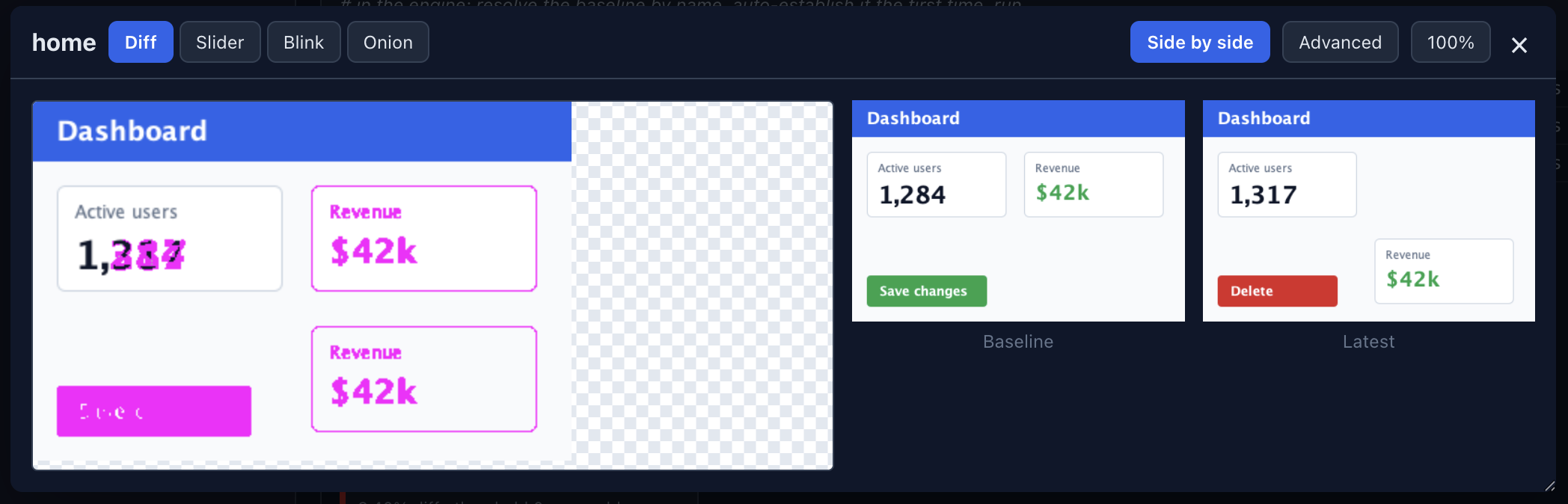
- Advanced reveals editing: live re-diff controls — ignore mode, error type, error colour (presets or a custom colour picker), and transparency — that recompute the diff in your browser as you change them; ignore-box authoring (drag on the diff to draw, resize handles, delete — boxes stay within the image); and the Show options / Rebase actions. These controls open on the options actually used for the comparison, so a
.jsonyou committed is reflected immediately.
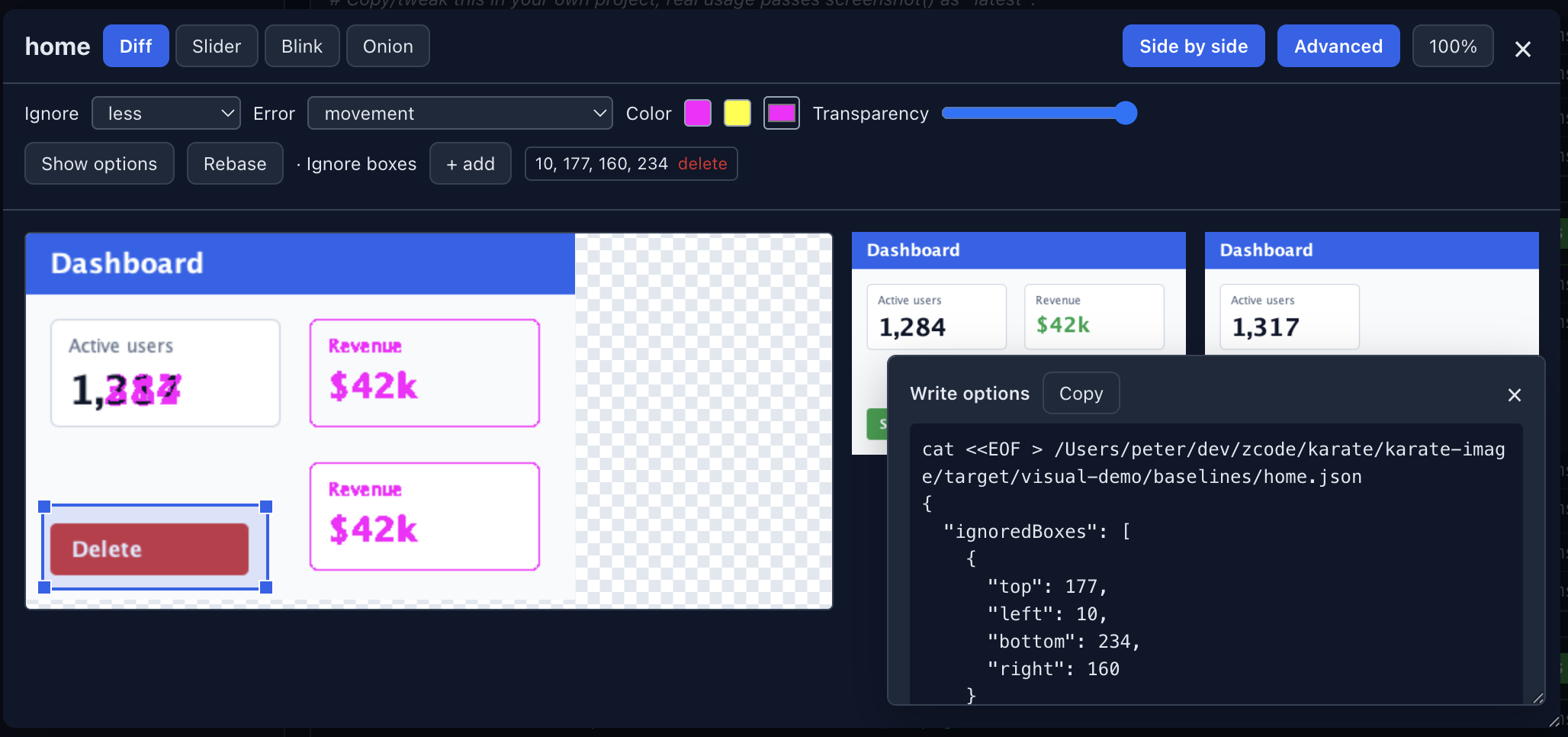
Show options and Rebase open a small command panel — draggable by its header and resizable, parked to the side so it never hides the diff. Show options emits the JSON for the options + ignore boxes you set interactively; Rebase emits the copy-paste rebase command. Both refresh live as you change options, and Copy confirms when the text is on your clipboard.
Live re-diff works even from a file:// report (the source images are inlined as base64 on this embed's metadata), and embeds render lazily as you scroll, so large reports stay fast.
The report config key controls when the diff is attached: 'mismatched' (default) only on a difference, 'all' on every comparison, null never.
A static CI report can't write files, so there's no one-click "accept as baseline" button. The lightbox's Rebase button gives you a copy-paste command (e.g. cp <latest> <baseline>); or run image.write('<name>', <latest>) in a test. Commit the updated baseline either way.
Browser automation
Image comparison pairs naturally with UI tests — your screenGrab recipe captures with screenshot() and hands the bytes to image.diff:
Scenario: homepage looks right
  * driver 'https://example.com'
  * waitFor('.hero')
  * screenGrab('homepage')
The extension never calls the driver itself — the recipe passes the image in — so it stays decoupled and works just as well with images from any source. See UI Testing for browser setup.
A complete example
// karate-boot.js
const image = boot.ext('image');
image.baselineDir = 'baselines';
image.threshold = 0.5;
// common.js (loaded via karate-config.js) — the screenGrab recipe from above
function screenGrab(name) {
  const latest = screenshot();
  const p = image.resolve(name);
  const established = !p.baselineExists;
  if (established) image.write(name, latest);
  const r = image.diff(name, latest);
  r.baselineEstablished = established;
  if (r.embed) { r.embed.meta.baselineEstablished = established; karate.embed(r.embed); }
  if (!r.pass && image.failOnMismatch !== false) karate.fail(r.error.message);
  return r;
}
Feature: visual regression

Scenario: dashboard
  * driver 'https://example.com/app'
  * waitFor('.dashboard')
  # first run establishes baselines/dashboard.png and passes;
  # later runs compare against it and fail on a regression
  * screenGrab('dashboard')

Scenario: pricing page (more tolerant — see baselines/pricing.json)
  * driver 'https://example.com/pricing'
  * waitFor('.plans')
  * screenGrab('pricing')
Troubleshooting
Images won't match
- Confirm dimensions are identical, or set
allowScaling: true. - Raise
thresholdfor acceptable minor differences. - Use
ignoredBoxesfor dynamic regions, orignoreColorsfor anti-aliasing noise. - Try
engine: 'ssim'when the difference is perceptual rather than pixel-exact.
image is not defined
The extension isn't activated. Add a karate-boot.js at your working-directory root that calls boot.ext('image'), and make sure karate-image is on the classpath (or its JAR is in ~/.karate/ext/).
Baseline maintenance
- Commit baselines (and their
.jsonoption files) to version control. - Review diffs in the report before rebasing.
- Use consistent screenshot dimensions (viewport size, device scale factor) across runs.
Resources
- Resemble.js — the pixel-diff algorithm
- SSIM — structural similarity background